

Tips
This example assumes you are running Hyperterm on a Windows PC. Hyperterm is started by clicking START then Accessories then Communication then Hyperterm.
When you first start Hyperterm, you should see this blank screen. What Hyperterm does is try to make serial connections to other devices. It used to be that the most common device anyone wanted to connect to was a modem that was hooked to the phone line. Hyperterm is mostly used for this, but it can also be used to connect to devices connected to the COM ports on your PC, such as the RS232 port or even the USB port.
A number of devices, such as the COSMIC RAY detector board, use a USB connector to connect to your PC. The COSMIC RAY board requires a driver which simulates a COM port on the PC when it is connected. Depending on what is connected to your PC, the COSMIC RAY board's serial connection will be assigned to one of the COM ports. Typical COM port names are COM3,COM4, COM5.
 Click on File and then on Properties in the Hyperterm
window.
Click on File and then on Properties in the Hyperterm
window.
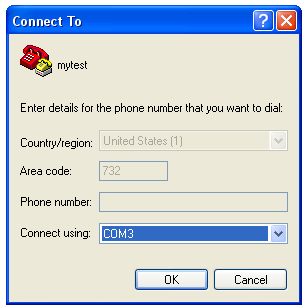 This brings up a dialog box titled Connect To. Set the COM port
that your COSMIC RAY detector board is using into the Connect using:
field and click OK.
This brings up a dialog box titled Connect To. Set the COM port
that your COSMIC RAY detector board is using into the Connect using:
field and click OK.
Next you should change the Port Settings to match the settings
 pictured. That is, 115200 bits per second (bps), 8 Data bits, Parity
None, 1 Stop bit, and Xon/Xoff flow control. Then click Apply
and then OK.
pictured. That is, 115200 bits per second (bps), 8 Data bits, Parity
None, 1 Stop bit, and Xon/Xoff flow control. Then click Apply
and then OK.